> For the complete documentation index, see [llms.txt](https://docs.openspaces.design/llms.txt). Markdown versions of documentation pages are available by appending `.md` to page URLs; this page is available as [Markdown](https://docs.openspaces.design/readme-1/customer-accounts/login-page.md).
# Login Page
### **What You’ll Learn**
* How to enable and customize the login page template for legacy customer accounts
* How to modify the login form appearance using theme settings
* How to adjust text, button styles, layout, and links
***
### 🧩 Overview
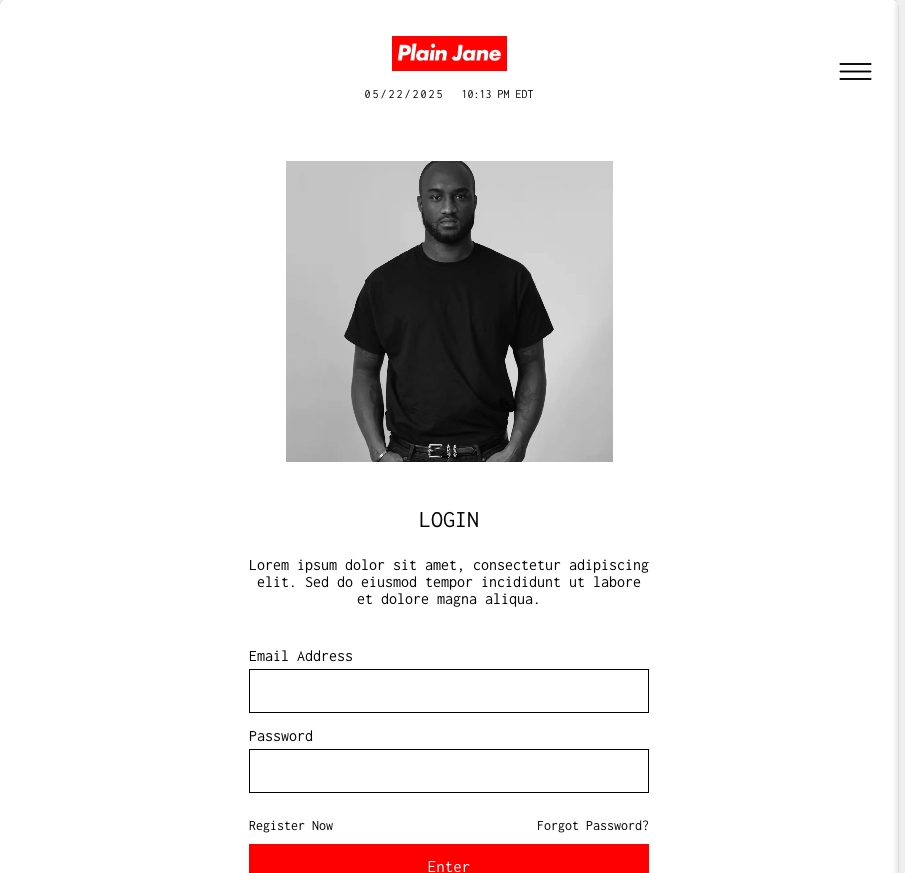
This login page is part of Shopify’s **legacy customer account system** and is fully customizable using your theme editor. It supports custom layout blocks, side images, and stylized input fields — offering full visual control of the customer login experience.
> ⚠️ This login page only applies when **Legacy Customer Accounts** are enabled under **Settings > Customer Accounts**.
***
### 🎨 Page Structure
The login page is composed of the following sections:
* **Logo & Clock** (Optional)
* **Login Form** (Core functionality)
* **Music Player** (Optional)
* **Footer** (Optional)
***
### ✏️ Customizing the Login Form
Navigate to **Theme Editor → Templates → customer/login.liquid**\
Click the **Login Form** block to begin customizing.
#### 🔳 Login Side Image
* **Choose an Image** – Upload or select a branded image
* **Side Image Position** – Choose left or right
* **Curve Side Image** – Adds rounded corners
* **Remove Side Image** – Toggle to hide completely
***
#### 🧾 Login Header Content
* **Header Text** – Title of the login block (e.g. “Log in” or “Welcome Back”)
* **Sub-Header Text** – Short description or custom message
You can also customize **header and subheader text colors**.
***
#### 🔐 Input Fields
Each form field has its own design settings:
**Email Field**
* Label Color
* Border Color
* Text Color
**Password Field**
* Label Color
* Border Color
* Text Color
***
#### 🔘 Login Button
Customize:
* **Button Text** (e.g. “Enter” or “Sign In”)
* **Text Color**
* **Background Color**
Use bold contrast to maintain accessibility.
***
#### ❗ Error Styling
Set the **Login Error Info Text Color** to match your brand's alert style (usually red).
***
#### 🔗 Additional Links
You can update the text and color for:
* **Register Link**
* **Forgot Password Link**
* **Back to Store Link**
These appear underneath or around the login form.
***
#### 🎨 Miscellaneous
* **Curve Fields & Buttons** – Toggle on for rounded corners on inputs and the login button.
***
### ✅ You're Done!
Your custom login page is now fully styled and live at:\
`yourstore.com/account/login`
> 💡 Tip: Pair this with the “Register Page” and “Account Page” docs to fully build out the customer journey.
### **Need Help?**
* 💬 **Join our community on Discord:**
* 📧 **Email us at:**
* 💻 **Live chat with us:** Available Monday–Friday, 10AM–6PM EST, directly on our website
---
# Agent Instructions
This documentation is published with GitBook. GitBook is the documentation platform designed so that both humans and AI agents can read, navigate, and reason over technical content effectively. Learn more at gitbook.com.
## Querying This Documentation
If you need additional information that is not directly available in this page, you can query the documentation dynamically by asking a question.
Perform an HTTP GET request on the current page URL with the `ask` query parameter, and the optional `goal` query parameter:
```
GET https://docs.openspaces.design/readme-1/customer-accounts/login-page.md?ask=&goal=
```
`ask` is the immediate question: it should be specific, self-contained, and written in natural language.
`goal` is optional and describes the broader end goal you are ultimately trying to accomplish on behalf of the user. GitBook uses it to tailor the answer towards what is most useful for that goal.
The response will contain a direct answer to the question and relevant excerpts and sources from the documentation.
Use this mechanism when the answer is not explicitly present in the current page, you need clarification or additional context, or you want to retrieve related documentation sections.